


KJV Bible: Audio+Verse
4.54.86K Reviews
App Specs
- Version
- 1.8.4
- Updated On
- License
- Free
- Downloads
- 5,000,000+
- Developer
- JSK Developer
- Categories
- Books & Reference
- Platform
- Android
Screenshots




 Analysis by AppCompare
Choosing a Bible app often comes down to a practical question: will I actually open it when I have a spare minute? KJV Bible: Audio+Verse is built around the King James Version, with reading, listening, and daily verse content in one place. I find that combination most useful when I want a small, regular point of contact with scripture rather than a complicated study setup.
Where a connection changes the routine
A Bible app can feel dependable until a commute, a weak signal, or a phone’s data limits interrupt the moment. In this app, the central appeal is having scripture available for reading and audio, while the store summary also describes access offline. That makes it worth considering for people who want to keep a reading habit when a connection is unreliable, though I would still prepare before leaving home rather than assume every online-dependent part behaves the same way without a network.
For a practical test, I would open a passage while connected, then check what remains accessible after switching to a no-connection situation. That simple habit answers the question that matters most: whether the particular chapter or audio you planned to use is ready when you need it. It also avoids discovering a limitation halfway through a journey. Daily content and sharing may involve different connectivity needs from reading a passage, so I treat those as separate activities rather than assuming the entire app works identically offline.
Made for brief moments on a phone
The strongest use case I see is fitting scripture into ordinary gaps: listening while walking, reading a short passage before bed, or checking a bookmarked verse between other tasks. The daily verse notification can serve as a gentle prompt, but it works best as an invitation, not a substitute for choosing and reading a longer passage yourself. I would also use the search function before a discussion or personal reading session, when I know a phrase or chapter and want to reach it without paging through the whole text.
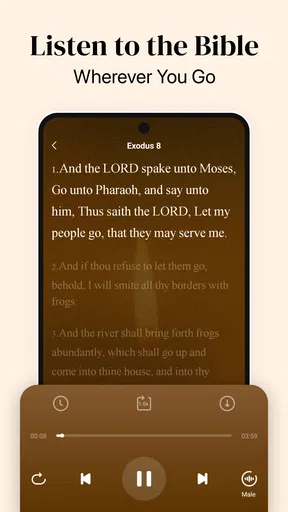
Audio is especially useful when my eyes are occupied or tired, but a phone speaker is not always the right way to listen. In a shared space, headphones are considerate; while walking, I would keep the volume low enough to stay aware of what is around me. The adjustable playback speed offers a useful trade-off: slowing down may help with unfamiliar phrasing, while a faster pace can suit a familiar chapter during a routine task. Neither setting replaces attention, so I would choose based on whether I am listening closely or fitting a passage into a busy day.
What to do when access is interrupted
If a verse or audio passage does not open as expected, I would first check whether the phone has a working connection, then try again after returning to a stable signal. For a passage I want during travel, I would verify access in advance instead of relying on a last-minute download or refresh. Bookmarks are also a sensible recovery tool: they make a meaningful passage easier to find again, but they are not the same thing as keeping a personal archive or backup.
That distinction matters if you are moving between devices or expect your notes and reading progress to follow you. I would treat this as a focused reading and listening companion, not assume it replaces a dedicated study library or a separately managed collection of saved material. Its simple layout is an advantage when I want to get straight to a verse; it may feel limiting if I need extensive cross-references, research tools, or a carefully organized study workspace.
Worth Reading Before You Choose

Flipboard Shows What News Apps Must Do Beyond the Feed

Switching to Android Auto Means Rethinking Your Driving Routine

Google Calendar Makes a Crowded Week Easier to Manage

Ludo King Makes the Most of the Minutes Between Plans

Baby Panda World Brings Quick Play to Modern Phones, but Its Game Library Feels Busy

ESPN’s Live Game View Makes Following Close Games Easier
Keeping phone use in perspective
Because the app combines audio, notifications, and sharing, I would decide which parts I actually want to use rather than turning every prompt into another reason to check my phone. A morning verse can be a helpful cue, but disabling or ignoring notifications is reasonable if they interrupt prayer, work, or rest. For data-conscious listening, I would use a trusted connection when possible and check the app’s behavior before making extended audio a mobile-data habit. I would not assume that audio, verse updates, and sharing all use the same amount of data or work under the same conditions.
Compared with carrying a print Bible, this app is easier to search and more convenient for listening, but the phone can bring distractions that paper does not. Compared with broad Bible study apps, its KJV-centered approach and straightforward reading tools may suit someone who wants a direct route into the text, while a reader who needs several translations or deeper reference material may prefer a more research-oriented alternative. For a new reader, the King James wording can be beautiful but unfamiliar; listening slowly and checking a passage in context can help, while someone who wants contemporary language may be happier with a different translation.
Perfect Blend of Old and New
Right off the bat, the KJV Bible: Audio+Verse app strikes a balance between maintaining the classic feel of the King James Version and incorporating modern technology. The app offers a comprehensive audio feature that lets you listen to the Bible on the go. Whether you're commuting, exercising, or just relaxing at home, the audio functionality is a game changer. Honestly, I never thought I'd enjoy listening to the Bible as much as I do now.
Ease of Use
Let’s talk about user experience. The app is designed with simplicity in mind, making navigation a breeze. The search function is particularly impressive. You can quickly find specific verses or chapters without having to scroll endlessly. Plus, the app allows you to bookmark your favorite passages, which is perfect for when you want to revisit a meaningful verse.
Additional Features
One feature I absolutely love is the daily verse notification. Every morning, I get a fresh verse delivered right to my phone. It's such a nice way to start the day with a little inspiration. If you're someone who enjoys sharing, the app also makes it easy to share verses with friends or family through social media or messaging apps.
Another cool feature is the ability to customize the app's appearance. You can choose from different themes and fonts, making it easy on the eyes, especially during those late-night reading sessions.
Audio Quality and Options
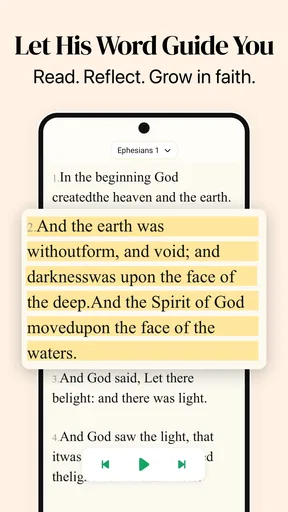
The audio quality is top-notch. The narration is clear and engaging, bringing the words to life in a way that reading alone sometimes can't. You also have options to adjust the playback speed, which is handy if you want to slow things down and really meditate on the words.
Why You Should Try It
If you’re looking for a way to integrate scripture into your daily routine, this app is a must-have. It's accessible, easy to use, and offers a unique way to experience the Bible. Whether you're a lifelong believer or just curious about the scriptures, the KJV Bible: Audio+Verse app is worth a download.
In conclusion, this app offers a rich and immersive experience that makes engaging with the Bible both practical and enjoyable. I can't recommend it enough for anyone looking to explore the scriptures more deeply.
Who will get the most from it
In the Books & Reference space, I see this as a good fit for readers who already like the King James Version or specifically want to become more familiar with its language. It is free, developed by JSK Developer, and has a 4.5 average from around 13,000 ratings, with more than 1 million installs. Those figures suggest it has found an audience, but the real decision is whether its particular mix of KJV text, audio, and daily prompts matches your routine.
The app is rated for Everyone and was released on June 12, 2024. Its current version is 1.6.2, and it supports devices running Android 8.0 or later. I would recommend it to someone who wants a compact Bible companion without paying for access, especially if listening is as important as reading. I would hesitate to recommend it as the sole tool for a student preparing detailed lessons, a reader comparing translations, or anyone whose main need is extensive theological reference material.
A realistic routine, and a useful trade-off
Imagine a weekday morning: I have a few minutes before leaving, so I read the verse notification, search for the chapter it comes from, and bookmark a line I want to revisit. Later, if I have a quiet stretch, I listen to that passage rather than trying to read on a crowded ride. The benefit is continuity: one short prompt can lead into a fuller reading when time allows. The trade-off is that notifications and audio both compete for attention, so I would keep the routine intentional instead of letting every alert pull me back to the screen.
For a less obvious workflow, I would use search to locate a passage first, then read a little before and after the verse I was looking for. A verse shared without context can be easy to misunderstand, and the speed of search makes it tempting to stop as soon as the matching line appears. Bookmarks can then act as a modest reading trail: save passages you want to return to, but review them occasionally so the list stays useful rather than becoming a pile of forgotten references.
Questions worth settling before relying on it
Will it suit someone new to the Bible? It can provide a simple way to begin, particularly through short daily reading and audio, but the KJV’s older wording may take patience. If that language feels like a barrier, a modern translation may be a better starting point; readers can still use this app when they specifically want the KJV.
Is it a replacement for a printed Bible? I would not frame it that way. It is more convenient for searching, carrying, and listening, while paper is better for an uninterrupted reading session without notifications or other phone distractions. Can it be relied on when travelling? The offline access described for the app is useful, but I would check the exact passage and audio I plan to use before leaving coverage. And should I use mobile data for listening? That depends on my plan and habits, so I would reserve longer sessions for Wi-Fi until I understand how the app behaves on my device.
My connectivity verdict
Connectivity shapes the edges of the experience more than the core reason to use this app. I like that reading and listening can fit into different parts of the day, and offline access makes it more practical beyond a dependable signal. Still, I would prepare passages ahead of a trip, keep notifications under control, and avoid assuming that every connected feature behaves the same way offline. If you want an approachable KJV reader with audio and quick ways to return to meaningful verses, this is a sensible option. If you need modern-language text, deep study references, or a distraction-free device, another format may serve you better.
Pros
- Comprehensive audio playback feature.
- Easy navigation through books and verses.
- Offline access for reading anytime.
- Daily reading plans to keep users engaged.
- Customizable font and display settings.
Cons
- Limited translations to only KJV.
- No social sharing features.
- Ads can disrupt the reading experience.
- Audio playback requires internet.
- User interface feels outdated.
FAQs for KJV Bible: Audio+Verse
What features does the KJV Bible: Audio+Verse app offer?
The KJV Bible: Audio+Verse app provides a comprehensive Bible reading experience with features including audio narration, verse highlighting, daily devotionals, and customizable reading plans. Users can easily navigate through chapters and verses, bookmark favorites, and access a wide range of study tools to enhance their understanding of the scriptures.
Is the KJV Bible: Audio+Verse app free to use?
The app offers a free version with basic features, allowing users to read and listen to the King James Version of the Bible. However, there are in-app purchases available for premium features like advanced study tools, ad-free experience, and additional audio narrations. Users can choose to upgrade for a more enriched experience.
Can I use the KJV Bible: Audio+Verse app offline?
Yes, the app allows users to download specific books or chapters for offline reading and listening. This feature is particularly useful for those who wish to study the Bible without relying on an internet connection, making it convenient for travel or areas with limited connectivity.
How user-friendly is the KJV Bible: Audio+Verse app for beginners?
The app is designed with a user-friendly interface that caters to both beginners and seasoned Bible readers. New users will find the navigation intuitive, with easy access to search functions, bookmarks, and personalized reading plans. Tutorials and guides are also available to help users make the most of the app’s features.
Does the KJV Bible: Audio+Verse app include any social features?
Yes, the app includes social features that allow users to share verses, notes, and daily devotionals with friends and family through social media or messaging apps. This fosters a sense of community and engagement, encouraging users to discuss and reflect on their readings together.


